
Konnect has over 70 reports that you can generate which will give you a very good insight on how your business is going.
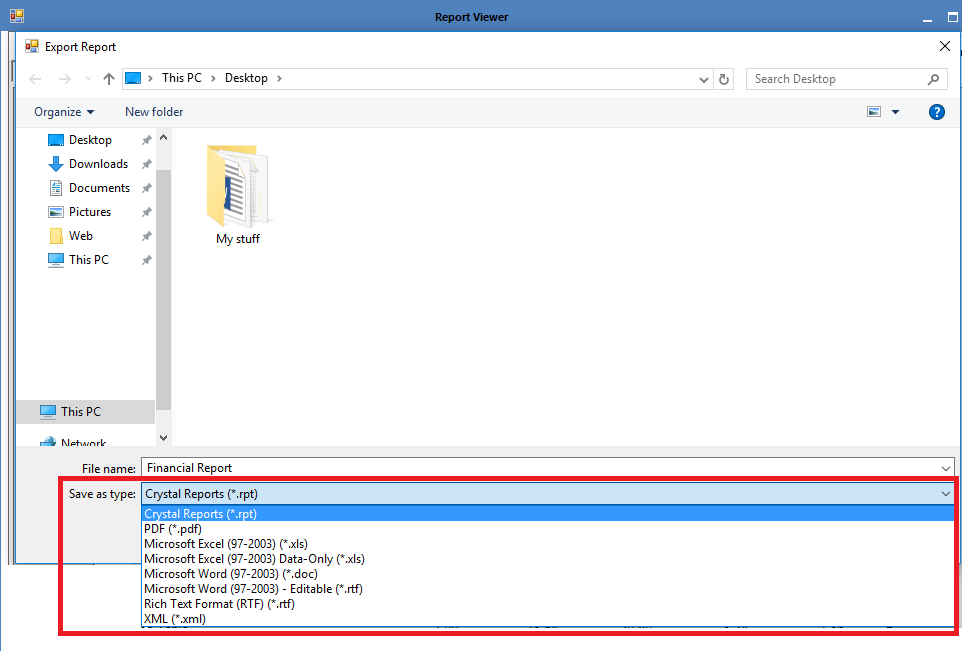
If you wish to export your report, you may do so. Konnect allows you to export in the following format:
- Crystal Reports (.rpt)
- PDF (.pdf)
- Microsoft Excel (.xls)
- Microsoft Word (.doc)
- Rich Text Format (.rft)
- XML (.xml)
To export a report:
Step 1: Generate the report in question and click the save icon on the top left corner.

Step 2: The Save option will appear. Ensure to select the export format of your report from the Save As Type drop down menu.
Step 3: Once saved, you should be able to find it in your saved report on the chosen location.
Note: You must have the program installed on your computer that is capable of opening the file, e.g. PDF viewer or Microsoft Excel etc.
If you do not have the right program to open the exported file, it will show as a white page icon.

If you do have the right program to open the exported file, it will show the program icon that is capable of opening it, e.g.Microsoft Excel etc.

0 Comments