
Along with creating a email marketing campaign, Konnect Spa and Salon Software has the feature of allowing you create a email using HTML coding. This is great as it gives you the flexibility of creating a campaign to your specification, whilst still being able to use the program to track your email campaign.
To create a HTML email:
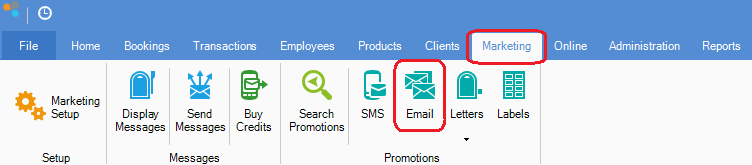
Step 1: Click on the Marketing tab and select Email.
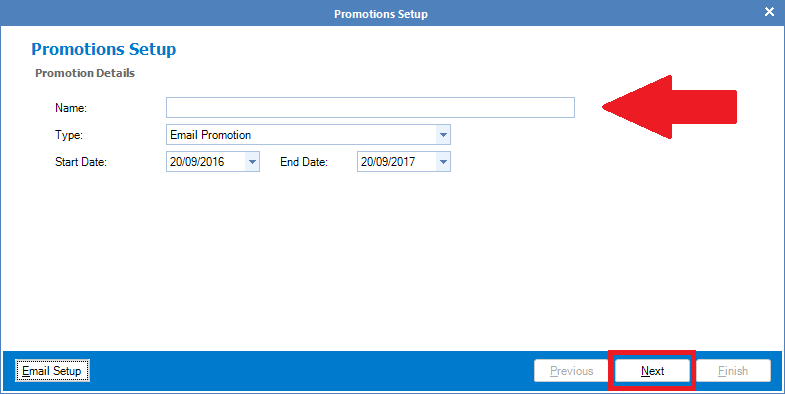
Step 2: The Email Promotions Setup screen will appear. Enter the name of the promotion and select Next.
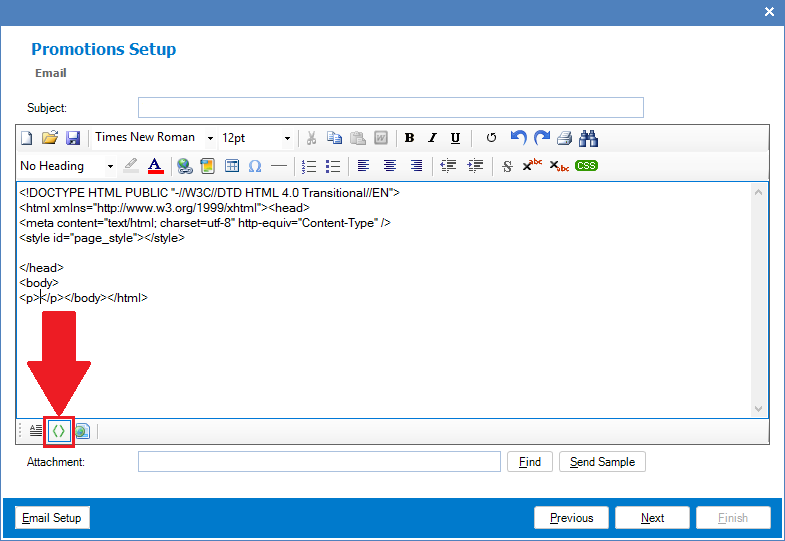
Step 3: The promotional email content will appear. To utilise HTML, press on the <> icon as shown on the screenshot below. Once you see some codes on the screen, you may paste your HTML code into the email field (you may send yourself a sample email to confirm that you are happy with the formatting). Once done, proceed with creating a promotion as per normal.
0 Comments