
Marketing is an essential part of your business. If used, it can bring in new clients and re-ignite loyalty to your establishment.
Unfortunately there will be some clients who do not wish to take part in any marketing campaigns.
It is important to ensure those clients wishes are respected and that they are not included in any future marketing campaigns you run, be it SMS or via email.
This is done by making sure the "Do Not Mail" box is ticked within their client card.
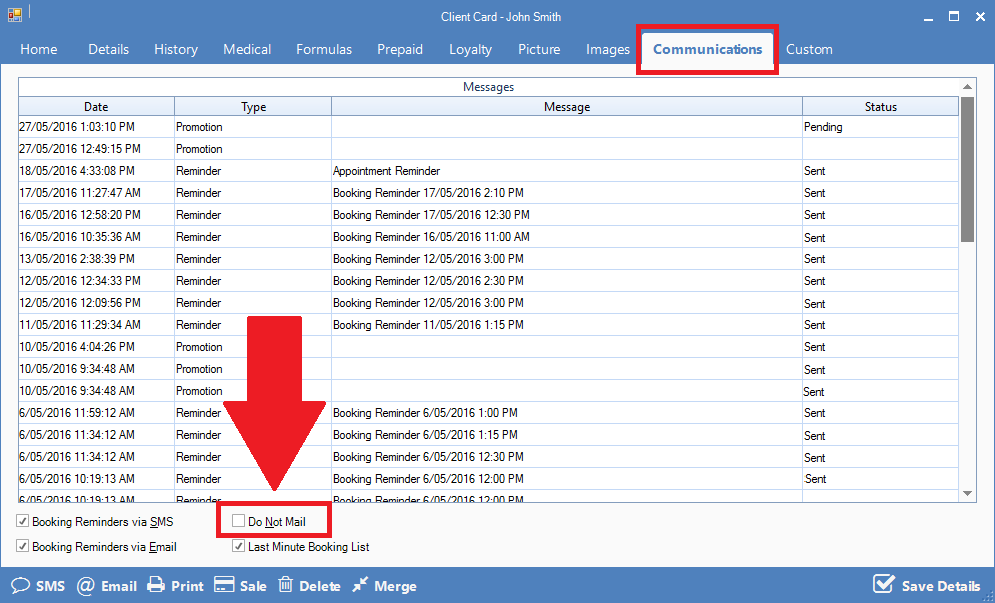
If you have sent out a marketing SMS campaign and the client replied "STOP", Konnect will recognise this as a opt-out request and will automatically locate the client card linked to the number and tick Do Not Mail. Note that this will ONLY work for SMS campaigns. For email campaigns, the client will need to call the store to inform their wish to opt out.
Hint: The automated do not mail feature will only work when the client reply "stop" only. If they add stop within a with a sentence, eg "Please stop sending me marketing stuff" etc, the system will not be recognised the request and you will need to manually tick the do not mail box.
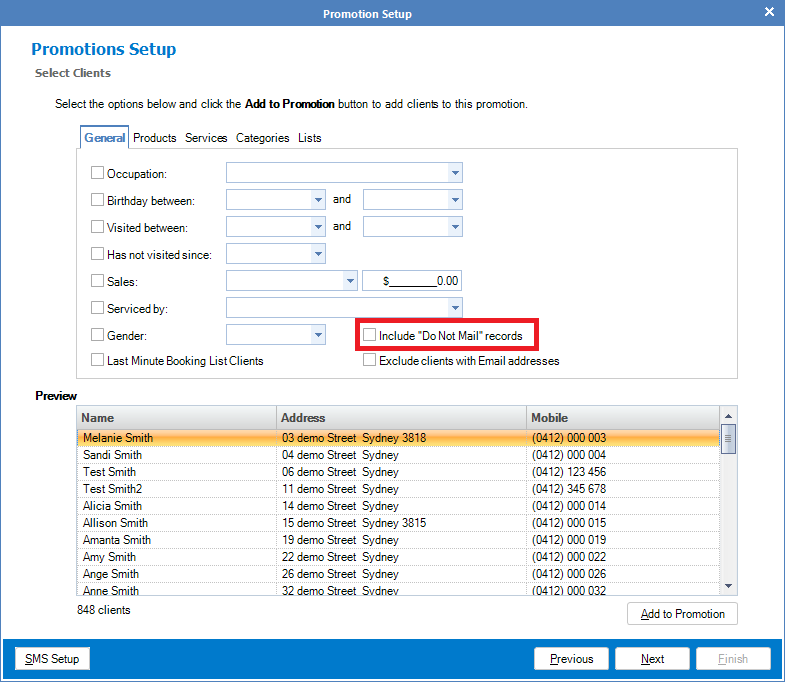
Note: When running a promotion, you may bypass the "Do Not Mail" criteria by ticking the "Include do not mail records". This will select clients even with 'do not mail' ticked in their client cards.
0 Comments