
Konnect helps you to keep track of your store petty cash by allowing you to enter them through the program as a transaction.
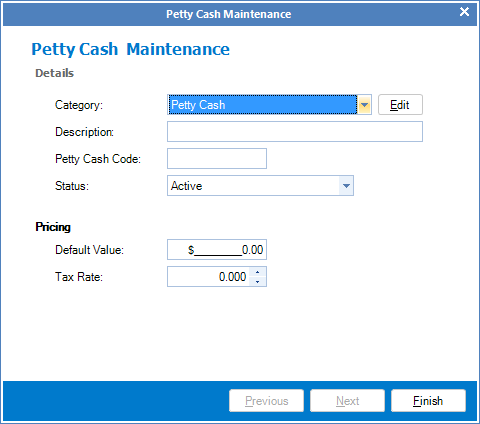
To enter Petty Cash, you must first create a petty cash code. To do this:
Step 1: Go to the Transactions tab and select New Code under Petty Cash.

Step 2: The Petty Cash Code Maintenance screen will appear. Follow the prompts to setup your petty cash code.
___________________________________________________________________
To enter a petty cash transaction:
Step 1: Go to the Transactions tab and select Petty Cash Payment.

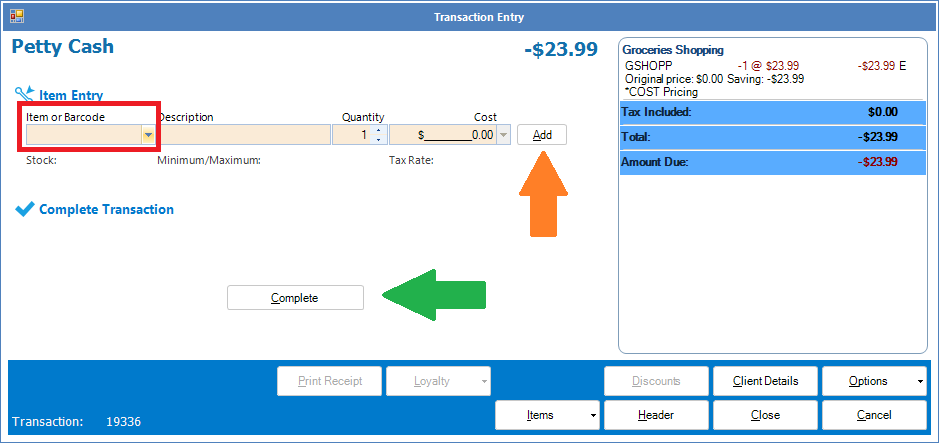
Step 2: The Petty Cash Transaction Entry will appear. Click on Item or Barcode (red square) to locate your petty cash code and adjust accordingly. Once done, click Add (orange arrow) and it will appear on the Transaction Entry. Select Complete (green arrow) to save the petty cash entry.
YouTube Video:
0 Comments