
A Safe Drop is important for maintaining a low amount of cash in the till to prevent robbery. Any money safe dropped will not be required to be recounted at the end of the day.
To do a safe drop:
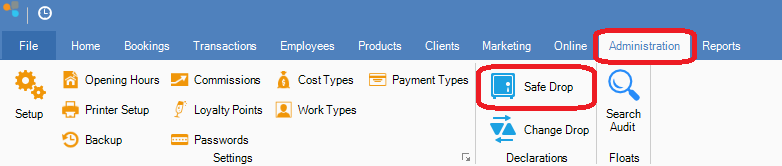
Step 1: Go to the Administration tab and select Safe Drop.
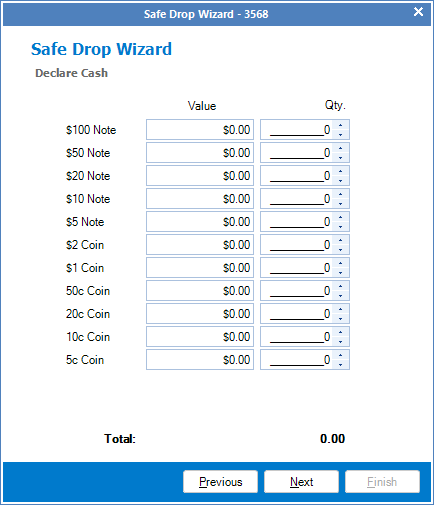
Step 2: The Safe Drop wizard will open. Enter the value of cash you wish to safe drop. Make sure you double check the values as an incorrectly entered value will put you out at the end of day. Once entered, click Next.
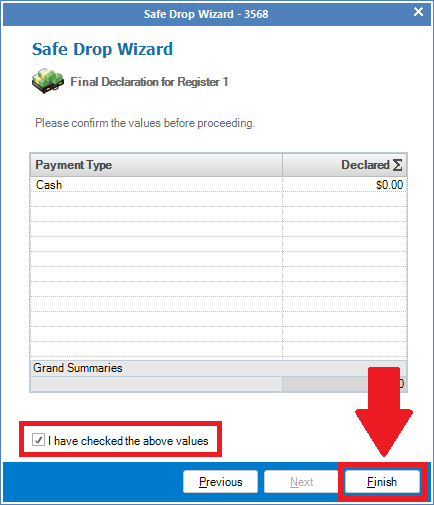
Step 3: On the Final Declaration page you will have a summary of your declaration. Check the "I have checked the above values" box and click Finish.
Note: Ensure that you have checked the values are correct as you cannot change the amount you declared after you have finalised your safe drop.
0 Comments