
NOTE: Before suspending an employee, it is IMPORTANT to ensure ALL future bookings have been moved/reassigned to different employees as once the employee is suspended, they won't be able to see those bookings however the bookings will still be active, just hidden.
To assist them in finding the employee's bookings, suggest them to run "Bookings by Employee" and select the future date to at least 12 months ahead in time.
The system does not automatically re-assign bookings by a suspended employee.
For Support Employee, please click here.
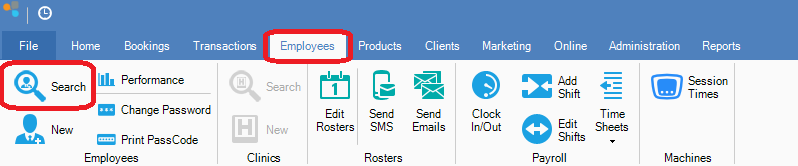
Step 1: Go to the Employees tab and select Search.
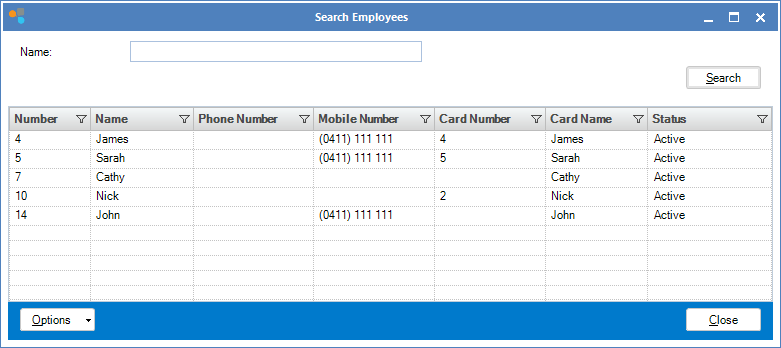
Step 2: The Search Employees screen will appear. Double click the employee you wish to suspend.
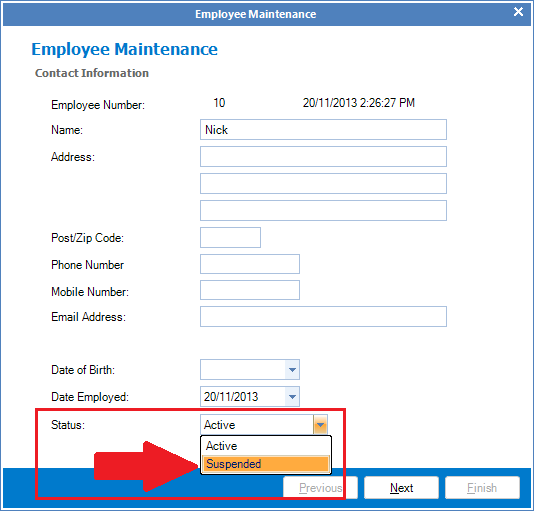
Step 3: The Employee Maintenance window will open. In the employee status field, select Suspended. Once done, click Next to the end and select Finish.
YouTube Video:
0 Comments