
Konnect can assign commissions based on sales of products or treatments. If you have an employee that is paid at a different rate you can set their commission rates in the Employee Maintenance screen.
To setup employee commission rates:
Step 1: Go to the Employees tab and select Search.
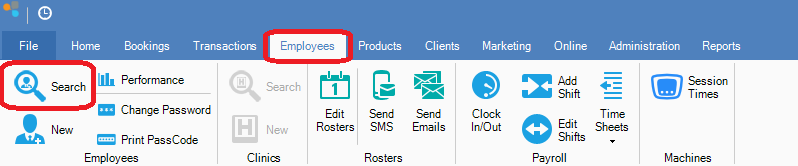
Step 2: The Search Employee screen will appear. Double click on your chosen employee to bring up the Employee Maintenance screen and click Next once.
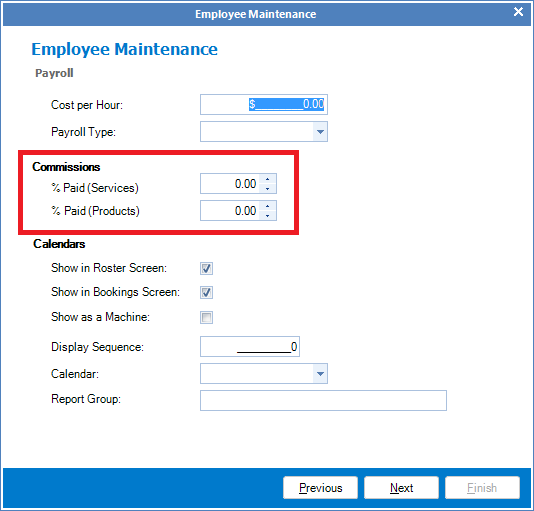
Step 3: Enter the commission percentage for Services and/or Products and once done, select Next until the end and click Finish to save.
To setup default commission rates:
Step 1: Go to the Administration tab and select Commissions.
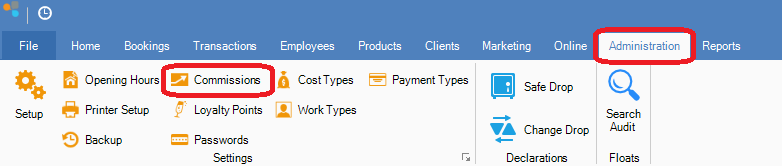
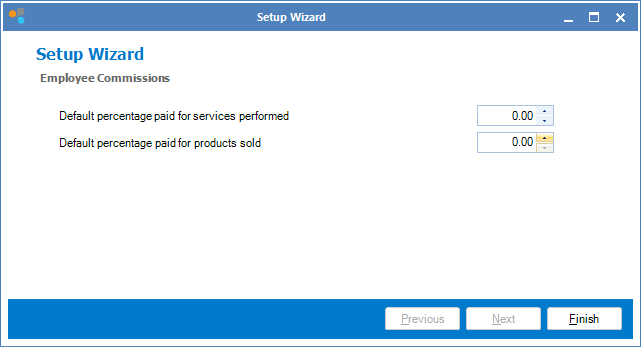
Step 2: The Employee Commissions setup wizard will display. You may now change the default commission rates for treatments and products as required.
Note:
- You can override the default commission rates for each employee by changing their commission rates on the Employee Maintenance screen.
- Changes to the default commission will not affect employee with set commission rates.
- Changes made to commission rates are not retrospective.
YouTube Video:
0 Comments