
Konnect can send booking reminders via email and/or mobile text (sms) to your clients.
To setup email booking reminders:
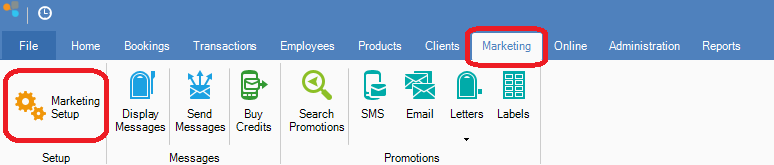
Step 1: On the Marketing tab, select Marketing Setup.
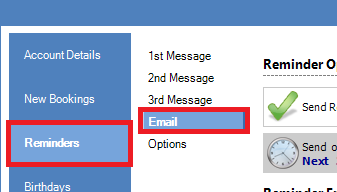
Step 2: The Marketing Setup window will open. Click the Reminders tab, then select Email.
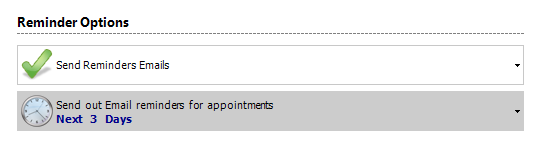
Step 3: In email reminders, you can select
a. If you would like to send reminders. Ensure this is selected as "Send Reminder Emails" with a green tick.
b. When you would like the reminders sent out. 2 Days Before is the recommended setting.
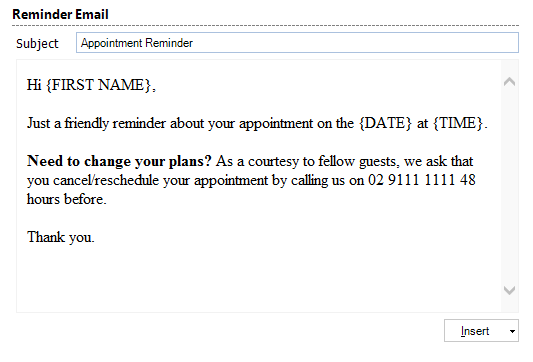
Step 4: Enter the message you would like to send as reminder.
Step 5: Once done, click Save.
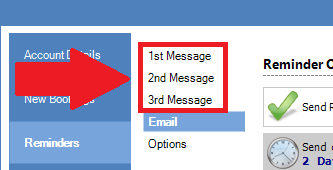
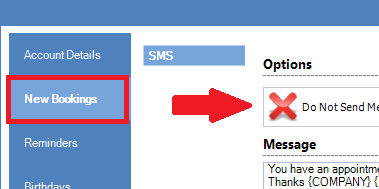
Step 6: Ensure all settings in 1st, 2nd and 3rd Message is set to do not send messages (with a red x). If not, the system will also attempt to send out SMS reminders, along with your email reminders.
Note:
- Reply feature (Yes and No) does not work with emails, only SMS.
- Only one reminder will be sent per booking. If you change the booking, another notice will not be sent.
- Konnect will only send reminders within the selected time frames.
- Client that do not have an SMS or Email address will not have reminders sent to them.
0 Comments